
Home › Best HVAC Software & Estimating Apps
HVAC is one of the few trades where the software has to do two distinct jobs: run the service call workflow (dispatch, invoicing, payments) and track the equipment at every address (unit model, install date, filter size, last service, warranty status).
Tools that skip the second job create busywork every time you show up to a property you’ve serviced before. This is a straight ranking of the best HVAC software for solo technicians and small shops in 2026, with pricing verified from live sources.
Starting out rather than switching? Our HVAC business hub covers startup costs, licensing, and what to charge.
For related trades, see best plumbing software or best apps for cleaning businesses. If you’re coming from ServiceTitan specifically, there’s also a full ServiceTitan alternatives breakdown.
For most solo HVAC technicians, HCP Essentials at $149/mo is the strongest single platform — equipment tracking, flat-rate price book support, review automation, and QuickBooks sync come together at a price that’s still 60–80% less than ServiceTitan. Choose Jobber if you skip flat-rate pricing and want a cheaper platform with a stronger client portal.
On this page
What HVAC businesses need from software1. Housecall Pro2. Jobber3. Workiz4. Markate5. FieldPulseWhich one should you pick?All picks at a glanceFAQ
What HVAC businesses need from software
HVAC service calls are equipment-centered in a way that cleaning or lawn care isn’t. Every service visit connects to a specific unit at a specific address — make, model, serial number, filter size, install date, and service history.
Software that doesn’t track equipment per customer creates a dead end every time you’re dispatched to a property you’ve worked before.
Beyond equipment tracking, solo HVAC techs need three things to run tight.
Flat-rate pricing — whether through a native price book or an integration like Profit Rhino — keeps quoting consistent and fast on-site.
Service agreements (maintenance plan management, scheduled seasonal tune-ups) create recurring revenue that smooths the seasonal demand swings of the trade. And review automation drives referrals in the peak season window when homeowners are shopping for a new HVAC tech.
Everything else (scheduling, invoicing, payments, QuickBooks sync) is table stakes. If a platform is missing any of the above three, note it before committing.
1. Housecall Pro — Best overall for HVAC
Housecall Pro is the strongest single platform for a solo HVAC tech because it’s one of the few tools under $200/month with genuine customer equipment tracking.
On Essentials at $149/month annually, every customer record stores their equipment — unit brand, model, serial, installation date, and service history. Show up to a call and pull up everything that was done to that system before you ring the doorbell.
HCP Essentials also includes automated Google review requests after every closed job, email and postcard marketing campaigns, GPS tracking, and QuickBooks Online sync. For an HVAC business where the spring and fall tune-up rush depends on homeowners finding you on Google first, the review automation pays for itself fast.
The visual price book on Essentials accelerates flat-rate quoting on-site — even before a Profit Rhino integration, having your standard repair prices preloaded with photos speeds the quote conversation.
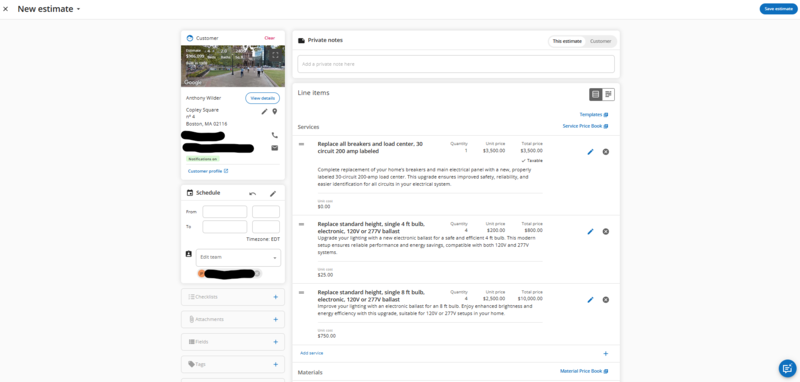
The cost is the main friction point. At $149/mo, HCP Essentials is $50/mo more than comparable Jobber Connect. It’s still dramatically cheaper than ServiceTitan (~$245–500/tech/mo) — but it’s the highest entry price in this roundup for a solo tech.
2. Jobber — Best value for HVAC
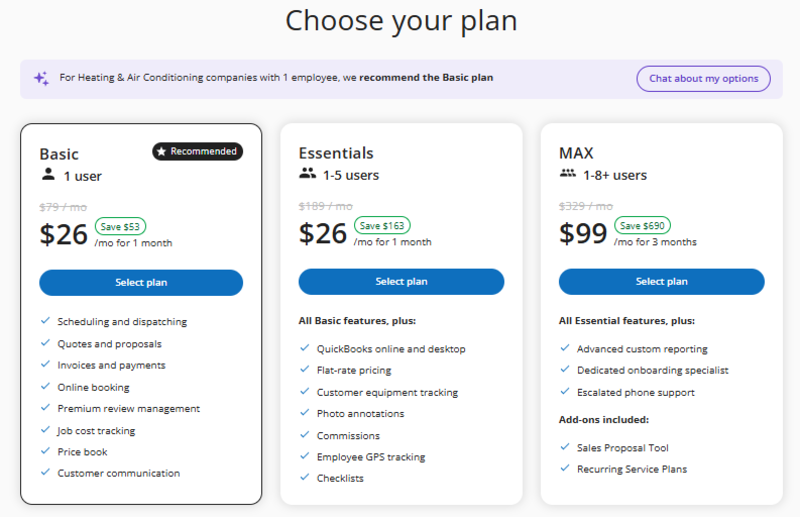
Jobber is the right call for a solo HVAC tech who wants a clean, fast platform without paying for HCP’s marketing features. Jobber Connect at $99/mo annually covers dispatching, on-site quoting, automated invoice follow-ups, auto-pay, and QuickBooks Online sync — the core service call workflow — for $50/month less than HCP Essentials.
Jobber also runs a recurring first-year promotion. As of August 2026 it cuts Core to $24/mo and Connect to $80/mo for the first 12 months, after which the standard rate applies. Jobber does not publish an end date for it, so check the live pricing page and budget on $99 rather than the promo figure.
Jobber’s Client Hub is the strongest client-facing feature in this category — a self-service portal where customers can approve quotes, view service history, and pay invoices online without a call from you.
The recurring job feature handles seasonal maintenance scheduling for customers on a tune-up plan. On-site quote builder lets you add line items from your saved rate list and text the approval link before you’ve packed up your tools.
The gaps for HVAC: Jobber has no native equipment-per-customer tracking at the Connect tier, no flat-rate price book integration below Plus (from $399/mo, 5-user minimum), and no review automation below Plus.
For a tech who’s built around flat-rate pricing and equipment tracking, HCP Essentials is worth the extra $50/month. For one whose workflow is more estimate-and-invoice, Jobber is the better deal.
3. Workiz — Best for emergency HVAC dispatch
Workiz is the right choice for an HVAC business where inbound phone calls are the primary lead channel — and emergency HVAC is very much a phone-first trade. Its built-in phone system, call tracking, and AI scheduling tools connect the inbound call to a dispatched job automatically, with the call recording attached to the job record.
Workiz has a free Lite tier (up to 2 users); paid plans start around $225/mo (Kickstart), $275/mo (Standard) and $325/mo (Pro), with the phone system as a separate add-on and additional users at $46–$65/month each.
Workiz does not publish every tier consistently, so confirm the current rate on its pricing page before you commit. The platform lacks the equipment-per-customer tracking that differentiates HCP for HVAC — it’s a dispatch-first tool, not an equipment-history tool.
Choose Workiz if: your business runs primarily on emergency call volume, you want every inbound call tracked and tied to revenue, and phone-to-dispatch speed is your competitive edge.
HCP Essentials gives a solo HVAC tech equipment tracking, review automation, and QuickBooks sync for $149/mo — try it free for 14 days.
4. Markate — Best budget option
Markate‘s Owner Operator plan runs $49.95/month, or $39.95/month billed yearly — one $479.40 payment. The base plan covers scheduling, invoicing, payments, lead management, and job costing plus QuickBooks Online sync, with extra employees at $5/month each. For a new HVAC tech who can’t justify $99–$149/month while building their client base, Markate is the most complete budget platform in this category.
Markate does not have dedicated equipment-per-customer tracking at the level HCP offers. It does support custom job notes and customer records where you can log unit information manually — workable for a small client list, tedious past 50 active customers.
Markate includes QuickBooks sync in its base Owner Operator plan, along with change-order and job tracking suited to HVAC service work.
The real catch is the add-on model. Markate’s low base price leaves out several things rivals bundle: automated review requests ($10/mo), online booking ($10/mo), a branded customer portal ($10/mo), and a business phone number ($10/mo).
An HVAC tech who wants review automation and online booking realistically lands at $60–$70/month — still well under HCP Essentials, but no longer the $39.95 headline.
5. FieldPulse — Best for growing HVAC shops
FieldPulse’s Professional tier adds project management and QuickBooks sync on top of core scheduling and dispatch. Enterprise adds multi-location management and an open API for integrations.
For an HVAC operation that’s grown past solo — 2–5 technicians with a dispatch coordinator — FieldPulse offers workflow depth that neither Jobber nor HCP match at comparable scale.
FieldPulse pricing is fully quote-based. Contractor reports put FieldPulse around $90/user/mo, but it’s custom-quoted so request a written quote.
For a pure solo tech, the hidden pricing is a friction point Jobber and HCP avoid entirely. Worth a quote call if you expect to be running 2–3 trucks within 12 months.
Which one should you actually pick?
Three questions settle this for most solo HVAC techs. Work through them in order.
Do you quote from a flat-rate price book? If yes, Housecall Pro Essentials. Jobber has no native Profit Rhino integration at solo tiers, so this one question alone decides it.
Do you need equipment history per address? If yes, Housecall Pro again. Nothing else here stores unit make, model, and service history at a solo price without manual workarounds.
Neither of those? Then HCP Essentials costs you $50/month for features you will not open. Jobber Connect at $99 covers quoting, invoicing, auto-pay and QuickBooks sync, and its Client Hub beats HCP’s customer portal.
Two situations sit outside that logic. If inbound emergency calls are your main lead source, Workiz’s built-in phone system and call tracking justify its higher price. If you are still building a client list and cannot justify $99/month, Markate at $39.95 annual does the core job — just add $10/month if you want review automation.
Subscription is only part of the bill. Our study on what field service software really costs in year one models the payment processing that sits on top of every plan below.
All picks at a glance
All prices verified July 2026. FieldPulse is custom-quoted; Workiz publishes plan pricing but bills its phone system separately.
FAQ
The most common software questions from solo HVAC technicians and small shops.
What is the best HVAC software for a small business?
Housecall Pro Essentials at $149/month (annual) is the best all-around HVAC software for solo technicians — equipment tracking per customer, review automation, QuickBooks sync, and email marketing come together in one platform. Jobber Connect at $99/mo is the better choice if you skip flat-rate pricing and primarily need fast quoting, invoicing, and a client self-pay portal.
Does Housecall Pro have equipment tracking for HVAC?
Yes — HCP Essentials includes customer equipment tracking that lets you store unit brand, model, serial number, and full service history per customer address. This is one of the main reasons HVAC techs choose HCP over Jobber, which has only basic property information at comparable price points.
What HVAC software integrates with Profit Rhino?
Housecall Pro integrates with Profit Rhino for flat-rate pricing. Profit Rhino runs around $50/mo for its flat-rate pricebook and integrates directly with Housecall Pro. Jobber does not have a native Profit Rhino integration below the Plus plan. For an HVAC tech who depends on a flat-rate price book, HCP is the stronger platform.
Is ServiceTitan worth it for a solo HVAC technician?
No — ServiceTitan costs approximately $245–500 per technician per month plus a $5,000–50,000 implementation fee. It’s designed for companies with 10+ technicians, a dispatcher, and office staff. Housecall Pro covers 80–90% of the same workflow for a solo tech at $149/month, with no implementation fee and a 14-day free trial. See ServiceTitan alternatives for small shops for the full comparison.
Does Jobber work for HVAC businesses?
Yes — Jobber handles HVAC scheduling, on-site quoting, invoicing, auto-pay, and QuickBooks sync well. The gaps are equipment-per-customer tracking and review automation, both of which require a higher-priced plan. For HVAC techs who don’t rely on flat-rate price books or systematic review campaigns, Jobber Connect at $99/mo is a solid and cheaper alternative to HCP Essentials.
Last verified: July 29, 2026 against each tool’s live pricing page.
Best Plumbing Software 2026
Top plumbing software picks for solo operators — scheduling, quoting, and invoicing from your phone.
ServiceTitan Alternatives
Leaving ServiceTitan? Here are the best small-shop replacements from $29/mo.
Jobber vs Housecall Pro
The two most common HVAC software picks compared head-to-head for solo operators.