
Home › ServiceTitan Alternatives
ServiceTitan is the software that HVAC, plumbing, and electrical companies talk about when they mean “enterprise field service” — but it’s priced for companies with 10–20+ technicians and carries implementation fees in the thousands. If you’re running one truck, or a small crew under five people, you’re paying for capabilities you’ll never use. These are the best ServiceTitan alternatives for small and solo shops in 2026, all verified from live pricing pages.
Working in a specific trade? See our best HVAC software and best plumbing software roundups.
ServiceTitan does not publish pricing publicly. Based on widely reported contractor estimates, expect $245–$500 per technician per month plus a $5,000–$50,000 implementation fee — a structure that makes zero sense for a one-truck business. Every alternative below is dramatically cheaper and faster to set up.
Jobber is the right default for solo operators leaving ServiceTitan or avoiding it — clean interface, strong client portal, and QuickBooks sync from $99/month. Choose Housecall Pro if you need built-in marketing. Choose Workiz if you run a phone-heavy operation.
On this page
Why leave ServiceTitan1. Jobber2. Housecall Pro3. Workiz4. Markate5. FieldPulseWhich one should you pick?All picks at a glanceFAQ
Why operators leave ServiceTitan (or skip it entirely)
ServiceTitan is genuinely powerful for a 10-tech operation with a CSR, dispatcher, and office manager. That’s exactly the problem — it’s built for a team, not for you. The three reasons solo and small operators walk away are cost, complexity, and contract lock-in.
Cost is the dealbreaker for most. At $245–$500 per tech per month, a solo operator pays $245–$500/month minimum, with no flexibility for slow seasons. Add a multi-year contract and a five-figure implementation fee, and the math becomes untenable before you’ve run a single job through the system.
Complexity is the second friction point. ServiceTitan is designed to be operated by multiple roles — CSR, dispatcher, tech, manager. A solo operator ends up doing all those jobs in the software too, navigating menus that assume someone else is handling each step.
1. Jobber — Best all-around replacement
Jobber replaces the core ServiceTitan workflow — scheduling, quoting, invoicing, payments, and client communication — at a fraction of the cost. Jobber Connect at $99/month (annual) covers a solo operator with QuickBooks sync, automated invoice follow-ups, auto-pay, and the Client Hub for client self-service. That’s under $1,100/year for what ServiceTitan charges per month.
The gaps versus ServiceTitan are real: Jobber has no flat-rate price book, no built-in call tracking, and thinner reporting than ServiceTitan’s analytics suite. For a one-truck business, those gaps don’t matter — you’re not managing a CSR team or running multi-location dispatch.
Setup takes days, not months. No implementation fee, no multi-year contract, 14-day free trial on the full Grow plan. See Jobber pricing in full before you decide.
One pricing note: Jobber runs a recurring first-year promotion. As of August 2026 it cuts Core to $24/mo and Connect to $80/mo for the first 12 months. Jobber does not publish an end date, so check the live pricing page — and budget on the standard $99, because that is what you pay from year two.
2. Housecall Pro — Best for marketing-driven operators
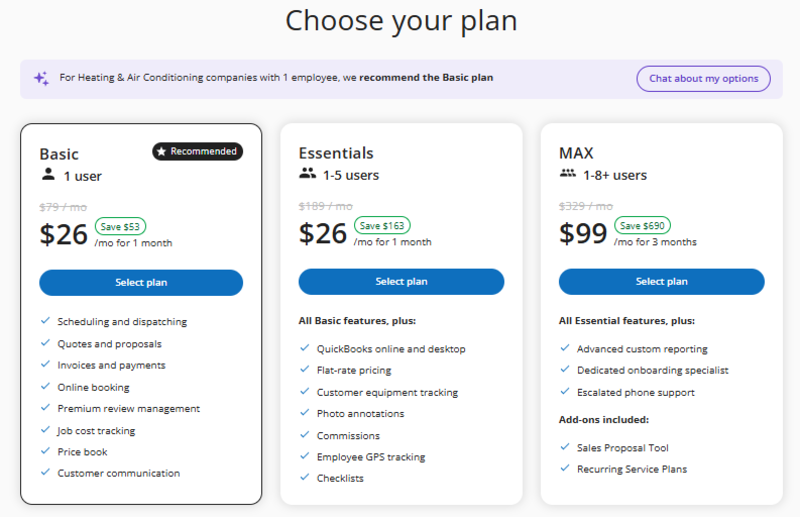
Housecall Pro sits between Jobber and ServiceTitan in depth — it’s more sophisticated than Jobber on marketing and customer communication, and far simpler (and cheaper) than ServiceTitan. HCP Essentials at $149/month (annual) adds built-in email and postcard campaigns, review automation, GPS tracking, and customer equipment tracking on top of core scheduling and invoicing.
For HVAC and plumbing operators coming off ServiceTitan who need equipment-per-customer tracking and flat-rate pricing support, HCP Essentials plus Profit Rhino integration (around $50/mo for the flat-rate pricebook) is the closest feature match at a fraction of ServiceTitan’s cost. The marketing tools are a bonus.
The cost is real: HCP Essentials at $149/mo is $50/mo more than comparable Jobber Connect. But it’s still 60–80% cheaper than ServiceTitan for a solo operator. Free 14-day trial, no contract commitment on the monthly plan.
3. Workiz — Best for phone-first service businesses
Workiz is purpose-built for service businesses where the phone is the primary lead channel — locksmiths, appliance repair, garage door, and similar trades that depend on speed-to-answer for conversion. It includes a built-in phone system, call tracking, and AI tools (Genius Leads, Genius Scheduling) that neither Jobber nor HCP offer at any price.
Workiz has a free Lite tier (up to 2 users), with paid plans starting around $225/mo (Kickstart), $275/mo (Standard) and $325/mo (Pro); the phone system is a separate add-on, and extra users run $46–$65/month each. Workiz does not publish every tier consistently, so confirm the current rate before you commit. The tool is overkill for operators who book primarily through online forms or word-of-mouth referrals.
Choose Workiz if: your business runs on inbound phone calls, you want call attribution tied to jobs and revenue, and you’re in a high-frequency, lower-ticket trade like locksmithing or appliance repair.
4. Markate — Best budget option
Markate‘s Owner Operator plan runs $49.95/month, or $39.95/month billed yearly — one $479.40 payment. That makes it the most affordable complete-platform alternative to ServiceTitan for a solo operator. It covers scheduling, invoicing, payments, lead management, job costing, and customer communication — the core workflow ServiceTitan handles — for under $500 per year.
The trade-off is depth. Markate doesn’t have ServiceTitan’s analytics, multi-location management, or technician performance tracking. But those aren’t features a one-truck operator needs.
Adding employees costs just $5/employee/month — the cheapest per-seat rate in this comparison.
Choose Markate if: your priority is keeping software costs under $50/month, you don’t need a sophisticated client-facing portal, and you’re willing to accept a less polished interface in exchange for comprehensive functionality at a low price.
Price the add-ons before you switch, though. Markate leaves out several things bundled elsewhere: automated review requests ($10/mo), online booking ($10/mo), a branded customer portal ($10/mo), and a business phone number ($10/mo). A realistic setup lands around $60–$70/month — still a fraction of ServiceTitan, but not the $39.95 headline.
5. FieldPulse — Best for growing small teams
FieldPulse’s Professional tier adds project management and QuickBooks sync on top of the core scheduling and dispatch features in Essentials. Enterprise adds multi-location and an open API. For a small operation that’s grown past pure solo — 2–4 technicians — FieldPulse’s depth in project tracking and workflow customization is a real differentiator versus Jobber.
FieldPulse does not publish pricing; all plans are quote-based. Contractor reports put FieldPulse around $90/user/mo, but since it’s custom-quoted you should request a written quote at fieldpulse.com. The platform is consistently rated highly by small-team operators who outgrew Jobber but don’t need ServiceTitan’s full suite.
Choose FieldPulse if: you’re managing 2–4 techs, you need more project management depth than Jobber offers, and you’re comfortable with a sales-quoted pricing process.
Which replacement should you actually pick?
Leaving ServiceTitan usually means one of three things went wrong. Match yours.
Left because of cost? Jobber Connect at $99/mo, or Markate at $39.95 if you need to go lower. Both drop your software bill by well over 90% with no implementation fee.
Left because of complexity? Jobber. It is the fastest of these to set up alone, and you can run a full quote-to-payment cycle on day one without an onboarding call.
Left but still need dispatch depth? Workiz for phone-driven work, FieldPulse if you are running 2–5 techs. These are the closest to ServiceTitan’s operational feel at a fraction of the price.
One warning worth stating plainly. If you genuinely need multi-crew dispatching, inventory, and a dedicated office admin, none of these five fully replaces ServiceTitan — you will be trading capability for cost. The switch makes sense when you are paying enterprise rates for a one- or two-truck operation.
Leaving on cost? Compare the full picture. Our study on what field service software really costs in year one models payment processing alongside the subscription for each of these.
Side-by-side comparison
All prices verified July 2026. Workiz and FieldPulse require quotes — ranges shown are from reported user data.
Most solo and small shops land on Jobber or Housecall Pro after leaving ServiceTitan. Start a free trial and keep the features that matter without the enterprise price tag.
FAQ
The most common questions when moving away from ServiceTitan to a smaller-business tool.
Is there a cheap version of ServiceTitan for small businesses?
No — ServiceTitan does not offer a small-business or solo tier. The pricing structure starts at approximately $245/tech/month and is designed for operations with 10+ technicians. Jobber, Housecall Pro, and Markate are purpose-built for small operators and start from $29–$59/month.
What do HVAC companies use instead of ServiceTitan?
Jobber and Housecall Pro are the most common replacements for HVAC operators under 5 technicians. HCP Essentials with Profit Rhino integration is the closest feature match for operators who need flat-rate pricing books and equipment tracking. See our best HVAC software for small shops roundup for a full comparison.
Can I migrate my ServiceTitan data to Jobber?
Yes, though there’s no automatic migration tool. You export customer and job history from ServiceTitan (CSV format) and import into Jobber. Jobber’s support team assists with the import. Budget a full day for data cleanup and testing before going live in your new system.
Does Housecall Pro have the same features as ServiceTitan?
No — HCP covers the core field service workflow (scheduling, dispatch, invoicing, payments, GPS) but lacks ServiceTitan’s advanced reporting, technician performance analytics, and multi-location management. For a solo operator or small team, the missing features rarely matter.
How long does it take to set up Jobber vs ServiceTitan?
Jobber setup typically takes 1–3 days for a solo operator — most people are running live jobs within a week of starting the trial. ServiceTitan implementation typically takes 30–90 days and requires dedicated onboarding support, reflecting the system’s complexity and the team workflows it’s designed around.
Last verified: July 29, 2026. ServiceTitan pricing sourced from contractor reports — ServiceTitan does not publish pricing publicly.
Jobber Pricing 2026
Full plan breakdown — every cost before you commit to Jobber as your ServiceTitan replacement.
Jobber vs Housecall Pro
The two most common ServiceTitan replacements compared head-to-head.
Best HVAC Software
HVAC-specific picks for operators who need more than basic scheduling.