
Home › Software Reviews › Housecall Pro
Housecall Pro Review (2026): A Hands-On Test
We didn’t just read the marketing — we signed up, built and sent real estimates and invoices, scheduled a job, recorded a payment, and tested the customer portal.
Here is what Housecall Pro is actually like to run as a one-person business: where it shines, what it really costs, and the one reliability issue we hit along the way.
Housecall Pro is one of the most polished field-service platforms we have tested. The day-to-day job workflow, customer records, and branded customer documents are genuinely excellent. The catch for a crew of one is cost — the plan you will actually want runs about $149/month, card processing is 2.59%, and several features you would expect to be included are paid add-ons. It is worth it if you are scaling and value polish; if you are a true one-person shop watching every dollar, weigh it carefully against Jobber.
- Excellent end-to-end job flow: On-my-way → Start → Finish → Invoice → Pay, all timestamped
- CRM-grade customer records — lifetime value, outstanding balance, lead source
- Clean, branded estimates and invoices, plus a self-service customer portal
- Genuinely useful AI — “Write it for me” descriptions and CSR AI for missed calls
- Pre-built trade price book that makes onboarding fast
- Deep payments: cards, ACH, financing, even payroll in one place
- True cost is well above the sticker — processing fees plus paid add-ons
- The practical plan for a solo op is ~$149/mo, not the $59 headline
- Many “expected” features are ~$40/mo add-ons or locked to the top tier
- A persistent upgrade banner and payment prompts are always present
- We hit an outbound-email failure that shipped a false “sent” status (fixed fast by support)
What we actually tested
This review is based on a full hands-on run, not a feature list. We built an estimate, sent it to a real inbox, converted it to a job, scheduled it on the calendar, generated and sent an invoice, recorded the payment, and then logged into the customer portal to see the whole thing from the client’s side.
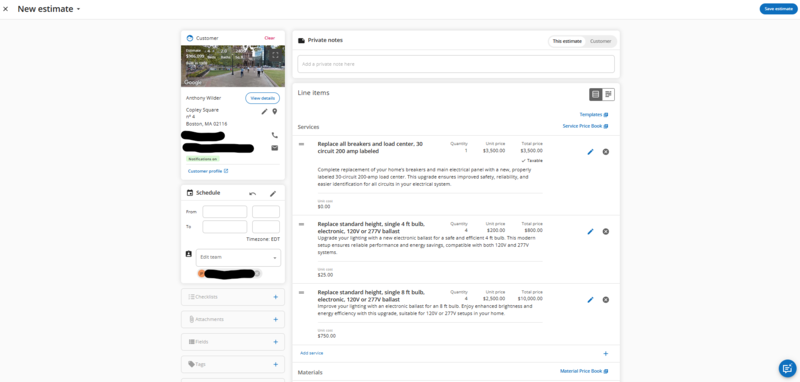
The estimate builder — a line item with an AI-generated description and the live cost/price split.
To be specific about what “hands-on” means here: we built a real estimate for a $2,450 panel upgrade, generated the line-item description with the AI, sent it to a live inbox as a branded PDF, approved it from the customer side, watched it convert to a job in one click, ran that job through its full lifecycle, generated and sent the invoice, recorded the payment, and then opened the reporting to confirm the revenue landed.
Every figure and screenshot below comes from that run. Where Housecall Pro blocked us, hid something behind an add-on, or behaved in a way that would trip up a new solo operator, we say so plainly.
The operational core is excellent
This is where Housecall Pro earns its reputation. The job lifecycle is the spine of the app and it is genuinely well built.
Every job moves along a clear lifecycle bar — On-my-way, Start, Finish, Invoice, Pay — and each step is timestamped, with travel time and on-job time tracked automatically. Job costing splits price from cost so you can see margin, checklists break work into sections, and the calendar offers multiple views with dispatch and a map. Underneath it all sits a CRM that is deeper than most field-service tools: each customer record shows lifetime value, outstanding balance, lead source, and full history.

The job lifecycle bar — the whole field-service workflow as five sequential buttons.
That lifecycle bar is the single best thing about the app. On-my-way fires a customer notification and starts a travel timer; Start stops travel tracking and begins on-job time; Finish marks the end; then Invoice and Pay. Every step is timestamped with an undo, so the job carries its own clock — on our test job it logged “on job: 2 mins” automatically.
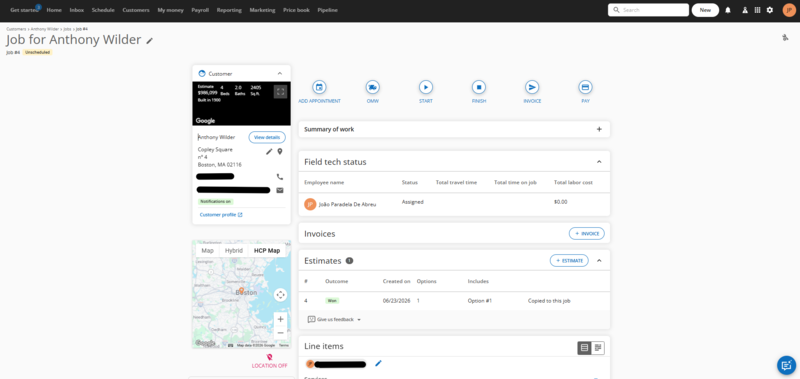
The job page: customer panel with street view, per-tech time and labor cost, and a full activity feed.
Underneath the lifecycle, the job page is dense in a good way. Line items carry a price/cost split (“for internal reporting only” → unit cost), which is what powers real margin reporting — you see profit per job, not just revenue. A field-tech status table tracks travel time, on-job time and labor cost per person, and an activity feed logs every action with a timestamp and a name, giving you a complete audit trail of what happened on a job and when.
Scheduling is the other half of the operational story, and it is clearly built for a business that dispatches. There are six calendar views — Schedule, Dispatch, Day, Week, Monday–Friday and Month — plus a calendar↔map toggle for routing, colour-coding by employee or area, and an employee filter sidebar.
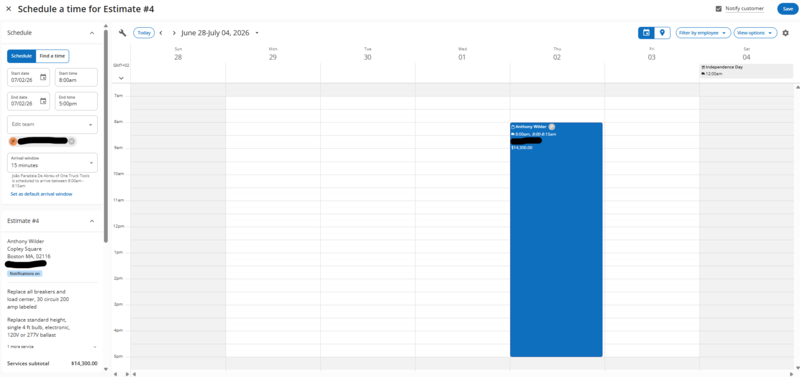
The schedule — six view modes, map routing, and territory “Areas”. Powerful, and more than a true solo op needs day one.
For a one-person crew, the dispatch board, route map and territory “Areas” are more than you need on day one — but they are exactly what you grow into when you put a second truck on the road, which is the whole point of choosing a platform you will not outgrow.
The AI is the 2025–26 story — and it’s useful
AI is woven through the product, and unlike a lot of bolted-on AI, the most useful pieces are the ones a solo operator will actually touch.
The standout for us was “Write it for me”: from just a service name, it generated a clean, professional line-item description in a couple of seconds, with regenerate and one-click apply. For a one-person business writing its own quotes, that is real time saved. AI also threads through the inbox — a CSR AI that catches missed calls is arguably the most valuable piece for a solo op who can’t answer the phone on a ladder — and into reporting.
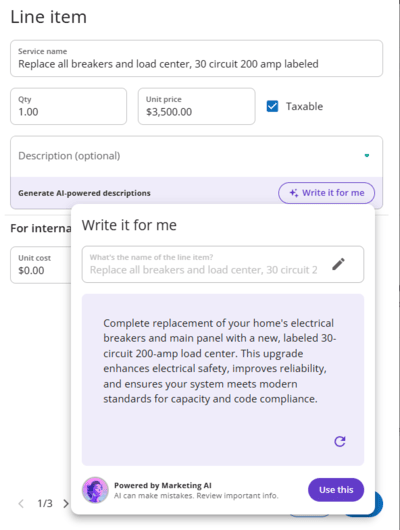
The “Write it for me” generator turns a bare item name into clean, customer-ready copy in one click.
The most useful piece of AI for a solo operator is the small one. The “Write it for me” generator (branded Marketing AI) turned the bare line item “Standard House Cleaning” into a clean, professional customer-facing description in about two seconds, with a regenerate button and a “Use this” to drop it straight into the estimate. For anyone who hates writing service descriptions, it genuinely removes a chore.
Beyond that, AI is threaded through the whole app as HCP’s headline 2025–26 bet. There is an AI Team you toggle on like staff: Help AI (in-app guidance), HCP member AI (answers customer questions), and the standout for solo ops, CSR AI — an agent that answers calls and captures leads when you can’t pick up because you’re on the tools. There’s also “Ask Analyst AI” in reporting and “Ask AI” on the customer record.
Customer documents and the portal feel professional
A solo operator lives or dies on looking established, and this is one of Housecall Pro’s quiet strengths.
Estimates and invoices render as clean, branded PDFs straight out of the box — your logo, itemized lines, subtotals, totals, and terms — even before you customize anything. Customers also get a self-service portal where they can view and approve estimates and view and pay invoices, all under your branding. In our test the customer could open Estimate #3, approve it, and see both invoices marked paid, exactly as you would want a client to experience it.
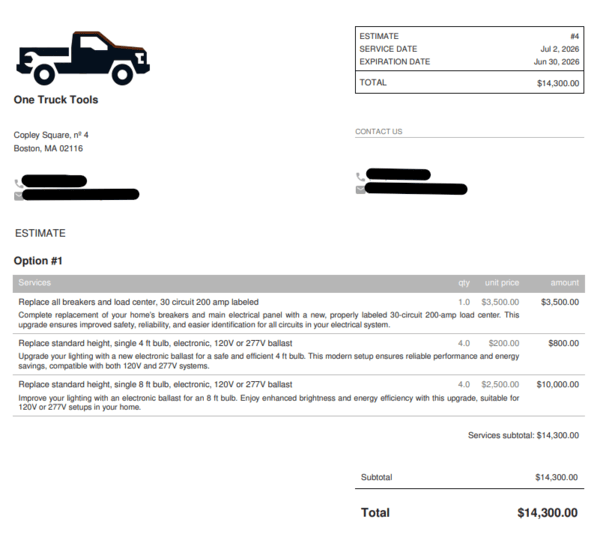
The customer-facing estimate — company header, logo, line items and totals, clean out of the box.
What the customer receives is genuinely polished. The estimate renders as a branded PDF with your company header, phone and email, your logo applied automatically, line items, subtotal and total, and a link to your terms — and you can choose between three layout templates. Even with a placeholder logo it looked like something a real business would send.
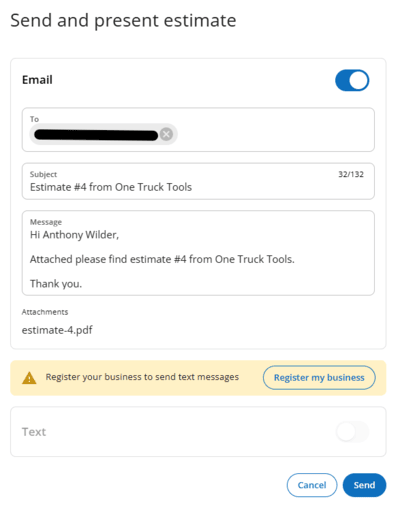
Sending is one step — the PDF is attached and emailed, with a confirmation back to you.
Sending it is one step: HCP attaches the PDF, emails the customer, and confirms “Estimate sent.” From the customer’s side, the document opens in a clean portal where they can review and approve — and approval is deliberately irreversible (“can’t undo”), which keeps the sold→job record honest.
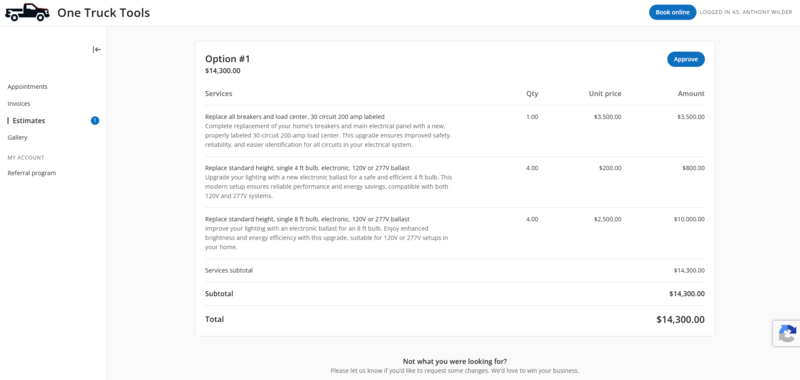
The client portal — what your customer sees when they open the estimate to review and approve.
The same professional treatment carries through to the invoice and receipt. Once a job is finished, the invoice inherits the line items and totals automatically, and the customer can pay online — card, ACH bank transfer, or monthly financing — or you can record cash, check or other manually.
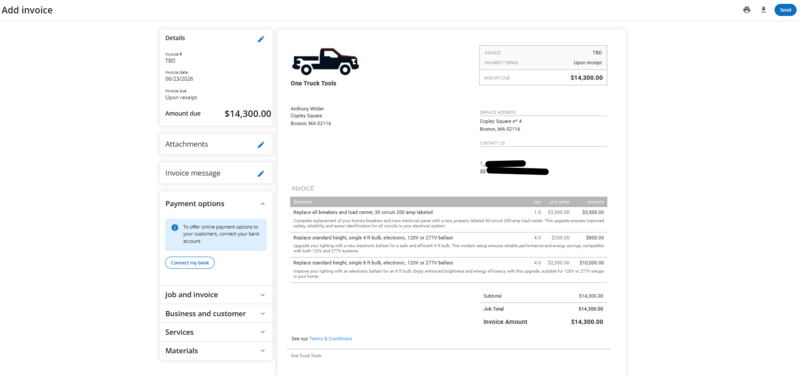
The invoice in the customer portal, with online payment and financing options built in.
Getting found: online booking and review automation
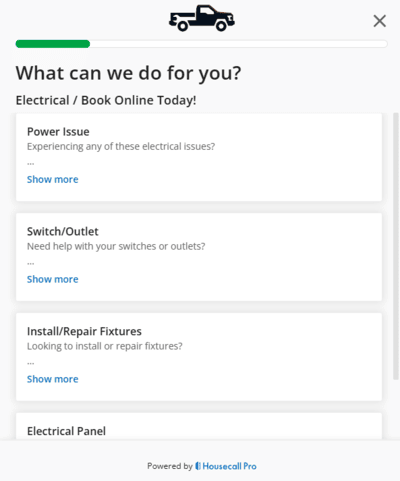
The customer-side online booking widget — embeddable on your site, and bookable straight from Google.
Two of the most ROI-positive features for a local solo business are in the base plan, which is worth crediting. Online booking gives customers a self-scheduling widget you can embed on your site, and through Reserve with Google they can book you straight from Google Search and Maps — the booking availability is defined once and respected across every channel.
The other is automated review collection: after a job is completed, Housecall Pro can automatically text or email the customer asking for a Google or Facebook review, then aggregate your rating. For local SEO, a steady stream of fresh reviews is one of the highest-leverage things a solo operator can do, and having it run on autopilot is a real advantage.
Be aware that the broader “Marketing Center” name oversells what’s included — postcards, email campaigns and a hosted website are all paid add-ons. The in-plan marketing toolkit is really booking plus review automation, which is still the part that matters most.
Customer records are genuinely CRM-grade
Most field-service tools treat the customer as a name and a phone number. Housecall Pro treats it as a hub. Each customer record rolls up a lifetime value and an outstanding balance, and hangs every job, estimate, invoice and lead off that one profile.
The depth shows in the details: a “Request card” action that asks the customer to save a payment method, a lead source and referred-by field for tracking where work comes from, per-customer tasks for follow-up, a split-billing “bills to” option, and a “do not service” toggle that quietly blocks scheduling and notifications for a problem customer.
For a one-job-a-week solo op this is more than you strictly need. But for the relationship-driven trades — HVAC maintenance plans, recurring pool or cleaning routes — knowing a customer’s lifetime value and history at a glance is the kind of thing that turns a one-off into a repeat client.
Pricing and the real cost
Housecall Pro’s headline price is not the price you will actually pay. This is the single most important thing to understand before you sign up.
There are three plans: Basic ($59–$79/mo, one user), Essentials ($149–$189/mo, the practical pick for most solo operators), and MAX ($299–$329/mo). On top of the plan, card processing runs 2.59%, and a stack of features many operators consider standard — Sales Proposals, Recurring Service Plans, Pipeline, Campaigns, Voice, Payroll — are paid add-ons at roughly $40/month each, or reserved for the top MAX tier. A persistent “upgrade now” banner and payment prompts are always on screen. The honest way to budget is plan + processing + the specific add-ons you need, not the sticker price.
For the full plan-by-plan breakdown, hidden fees, and what each tier actually includes, see our dedicated Housecall Pro pricing guide.
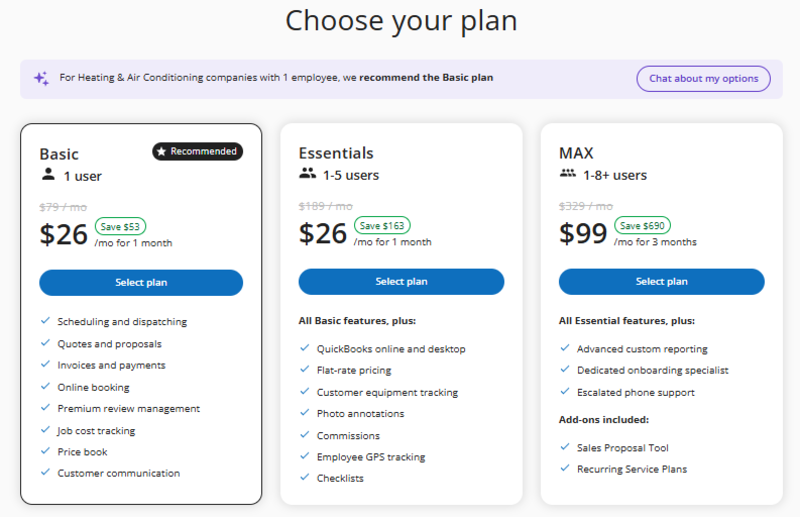
The three plans. The big promo numbers are first-month teasers — the list prices are what you actually pay ongoing.
Here is the honest version of Housecall Pro’s pricing. There are three tiers, and the headline discount (“save up to 86%”) is a first-month teaser — the list prices are what you pay from month two: Basic $79/mo (1 user), Essentials $189/mo (1–5 users), and MAX $329/mo (1–8+ users), with extra users at $35/mo each.
For a true one-truck operator, Basic is the plan, and at $79/mo it is noticeably pricier than Jobber’s entry tier — which is the single most important number in any Jobber-vs-Housecall-Pro decision. Basic does cover the essentials well: scheduling, quotes, invoicing, payments, online booking, review automation and a basic price book.
But the sticker price is not the real price. Card processing runs 2.59% on every payment you take, and several features a new operator would assume are included are actually $40/mo add-ons — the Sales Proposal tool, Recurring Service Plans, Pipeline, Campaigns, Voice, CSR AI, and HCP Assist among them. Flat-rate pricing, checklists and QuickBooks sync require stepping up to Essentials.
Takeaway: a false “sent” confirmation is a serious thing to ship — you’d have no way of knowing a customer never received the quote. Test your email delivery early by sending yourself and a real customer a test estimate before you rely on it.
The ecosystem: integrations and the app store
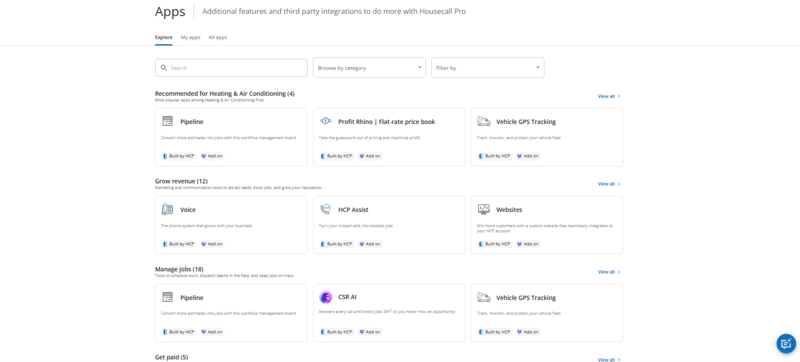
The app store: QuickBooks, Zapier and a marketplace of integrations over the core tools.
One thing a young competitor cannot easily match is an ecosystem, and Housecall Pro has built one. Beyond a quick-launch grid of pinned tools, there is an app store of third-party integrations: QuickBooks Online and Desktop, Zapier, and a marketplace of connected services.
For a solo operator the integrations that matter most are the accounting ones, pushing invoices and payments into QuickBooks so your books stay current without double entry. The wider marketplace is mostly relevant as you grow, but it is part of why established platforms are sticky.
Who it’s for — and who it isn’t
Housecall Pro is a strong product; the question is whether it’s the right strong product for a one-person business.
A good fit if you…
Are scaling or plan to hire, value polish and a professional customer experience, lean on flat-rate price books, or want payments, financing, and payroll under one roof.
Look elsewhere if you…
Are a true crew of one watching every dollar, just need lean scheduling and invoicing (Jobber is cheaper), or want a flat, all-inclusive price with no add-on math.
See exactly what Housecall Pro costs
Plans look simple until you add processing fees and the add-ons most operators end up needing. Our pricing guide breaks down all three tiers, the real monthly cost, and how it stacks up against Jobber for a one-person business.
Housecall Pro review FAQs
The questions solo operators ask most before committing.
Is Housecall Pro worth it for a solo operator?
It can be, if you value polish and a professional customer experience or you plan to grow. The operational core, branded documents, and customer portal are excellent. The reservation is cost: between the ~$149/mo practical plan, 2.59% card processing, and paid add-ons, a true one-person shop watching every dollar may get better value from a cheaper tool like Jobber.
How much does Housecall Pro really cost?
More than the $59 headline. Plans run $59–$79 (Basic), $149–$189 (Essentials), and $299–$329 (MAX). On top of that, card processing is 2.59%, and features like Sales Proposals, Recurring Service Plans, and Pipeline are roughly $40/month add-ons or MAX-only. Budget plan + processing + the add-ons you actually need.
What plan does a one-person business need?
Most solo operators land on Essentials (~$149–$189/mo). Basic covers scheduling, invoicing, payments, online booking, and a basic price book, but the features many operators want — flat-rate pricing, checklists, equipment tracking — sit on Essentials.
Does Housecall Pro charge card processing fees?
Yes — card payments run 2.59% per transaction by default. Housecall Pro makes money on payment flow as well as subscriptions, so factor processing into your real monthly cost, especially if you collect most payments by card.
What are the main downsides of Housecall Pro?
The aggressive monetization — the true cost is well above the sticker once you add processing and add-ons, and there’s a constant upgrade prompt. We also hit an outbound-email delivery failure that showed a false “sent” status, though support resolved it within six hours.
Is Housecall Pro better than Jobber?
It depends on your priorities. Housecall Pro is more polished and deeper on payments, AI, and customer experience; Jobber is simpler and cheaper for a lean one-person operation. See our full Jobber vs Housecall Pro comparison for a side-by-side.
Does Housecall Pro have a customer portal?
Yes. Customers get a branded self-service portal where they can view and approve estimates, view and pay invoices, and see their history. In our testing the experience was clean and professional from the client’s side.
Does Housecall Pro have AI features?
Yes, and they’re a core part of the 2025–26 product. The most useful for a solo operator are “Write it for me,” which drafts professional line-item descriptions from a service name, and a CSR AI that catches missed calls.
Keep reading
Go deeper on pricing, alternatives, and the head-to-head.
Housecall Pro Pricing 2026
The full plan-by-plan breakdown, processing fees, and add-on costs.
Jobber vs Housecall Pro
A side-by-side for solo operators — features, price, and the real difference.
Housecall Pro Alternatives
Five tools worth considering if HCP isn’t the right fit for your shop.
Software for crews of one.
See the real cost before you commit, and pick the tool that fits a one-person business.